Showing posts with label ipad 2. Show all posts

5 Reasons Why Your New iPad (iPad 3) Runs Hotter Than Your iPad 2

A lot of people are talking about the proposed ‘heatgate‘ issues effecting the new iPad (iPad 3). In fact earlier today we told you that the new iPad ran about 10 degrees hotter than the iPad 2. Now although heatgate seems to be a hot topic right now, a lot of people are not talking about the reason why the new iPad becomes warm during prolonged use. It is not a design flaw like Antennagate, rather, the actual specs of the new iPad that contribute to the increased operating temperature.
New iPad (iPad 3) heatgate
As brought to light by 9to5Mac, CNET spoke with DisplayMate’s Raymond Soneira about just why the new iPad is a bit “toastier”…
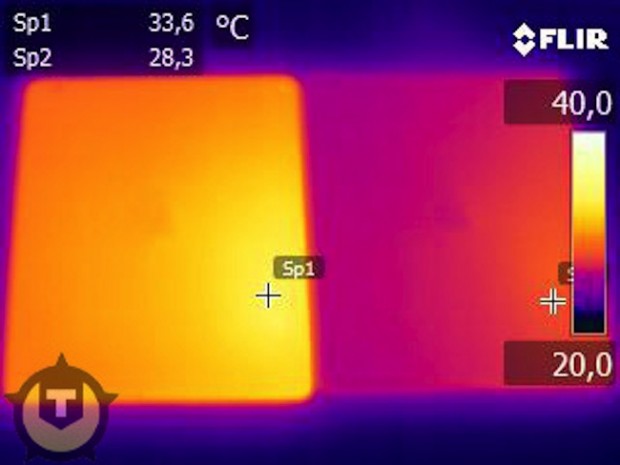
  1. Twice the LEDs: That means more heat coming from more LEDs. This is especially a problem at full brightness.
  2. 2.5X the power needed: The brightness efficiency is lower, because the new iPad has more pixels (which means more transistors) compared to the iPad 2. More pixels and transistors take up more space, meaning less opportunity for light to pass. “So they basically have to blast light through the LCD to make it come out.” Soneira adds: “I measured the LED power at maximum brightness–it’s two and a half times greater than on the iPad 2.”
  3. Battery generates more juice: The battery has to push out more power. This makes the battery warmer.
  4. Traditional LCD technology: Sharp’s power-efficient IGZO technology was not ready for the new iPad, which forced Apple to use traditional —and less power efficient— amorphous silicon tech. [To be fair, the older iPads also used this tech. Perhaps Apple was hoping to go 100-percent IGZO to offset the above].
  5. Qualcomm LTE Chip: Although not officially mentioned by CNET, the new iPad’s 4G connectivity support, allowing for faster than home broadband speeds, increases the operating temperature during continuous use due to the strain on the battery.
When you consider what Apple packed into the new iPad it is nothing short of a miracle that they managed to keep the operating temperature at only about an increase of 10 degrees to previous generations. Have you noticed that your new iPad runs hot during gaming or prolonged use? Share your responses in the comments section below…

Download iOS 4.3.4 For iPhone 4, 3GS, iPad 2, 1, And Pod touch [DIRECT LINKS]

As we’ve speculated over the last few days, iOS 4.3.4 made its debut on iTunes. The new release, without clear release notes, addresses the PDF exploit in Mobile Safari used by JailbreakMe.
IPSW
The release notes aren’t clear, only alleging “security fixes”, although we can confirm that JailbreakMe 3.0 doesn’t work in this release. Blocking this untethered jailbreak was Apple’s only goal with this release.
Any device supported by iOS 4.3, namely the 3rd and 4th generation iPod touch, the iPhone 3GS , the iPhone 4 and the iPad. While Apple clearly hadn’t planned for this release in advance, circumstances forced it: with such an important threat in the wild, not only allowing for a jailbreak, which in and of itself Apple dislikes, but also open up a huge breach that could lead unsuspecting users to have malware loaded onto their devices.
JailbreakMe 3.0 is a jailbreaking solution that allows devices to be hacked without a computer, just by pointing Mobile Safari to a JailbreakMe’s website. A pre-released version of this tool was leaked over the weekend, providing an untethered jailbreak for the iPad 2 for the first time ever before the final official release was made last week. Consequently, Apple began working on iOS 4.3.4 to address this issue.
It should be needless to say that if you’ve jailbroken or are planning to jailbreak your iPad 2 using JailbreakMe, stay away from this update and install PDF Patcher 2 from Cydia instead, which provides the same benefits as this update, plus it won’t break your jailbreak.. Most users might as well just wait for iOS 5, which should come out sometime in the Fall.
In order to install this update, connect your phone to your computer and launch iTunes, if it hasn’t launched automatically. From there, select your device from the sidebar, click on “Check for Updates” and select “Download and Install” when prompted. After a rather large download, your device should begin to update.
iOS 4.3.4 Install
Direct Download Links for iOS 4.3.4 (Official from Apple)

Download iOS 4.3.5 For iPhone 4, 3GS, iPad 2, 1, And Pod touch [DIRECT LINKS]

ust months before iOS 5 is released and ten days after iOS 4.3.4 came out, one wouldn’t expect to ever hear about iOS 4.3.5. It now turns out that yet another update for iOS 4.3 has been uploaded to Apple’s servers, allegedly fixing a critical security issue.
IPSW
No concrete information about this update has been provided about this update, other than it seems to fix an issue with certificate validation, as pointed out on Apple’s change log:
A security issue has been resolved with certificate verification.
iOS development has been on fire lately, with new updates being rolled out for both iOS 5 betas and iOS 4.3. Over the weekend, iOS 5 Beta was released, containing several enhancements to Apple’s upcoming iOS 5 as the release draws closer and closer. A week earlier, iOS 4.3.4 was released, which contained a security fix for Mobile Safari for a vulnerability that allowed a popular jailbreak method, JailbreakMe 3.0, to function. With 4.3.4 behind us, many has expected iOS 5 to be the next step for iOS but Apple has proven us wrong once again.
While it’s still unclear why Apple hasn’t stopped maintaining iOS 4.3 just several weeks before it’s fully replaced, the only possible explanation could be the gravity of the security vulnerability that was found. Although it might have been Apple’s intention not to update iOS 4 any further, the Cupertino company might have been forced to do it given the circumstances before hackers spotted the vulnerability first and started exploiting it.
If you have a untethered jailbroken device, you are advised to stay as far away from this update as possible.
Non-jailbreak iPhone, iPad, iPod touch users are strongly encouraged to download this update as soon as possible. You can do so by plugging your device into your computer, locating it in the iTunes sidebar and clicking on the "Check for Updates" option. The update should then immediately begin downloading and installing.
Direct Download Links for iOS 4.3.5 (Official from Apple)

iPad, iPad 2 get unofficial CF card compatibility

Given the impressive knockoffs and official camera kits we've seen, we'd say the iPad's definitely got the stuff to help out most shutterbugs, but up until now, uploading content from a CF card wasn't exactly easy. Well, our friends over at MIC Gadget recently showed off an iPad / iPad 2-compatible card reader that fixes that on the cheap. Simply called the CF card reader for iPad and iPad 2, the thing slips right into the slate's dock connector port and, as you can see from the video below, it transfers HD video and high-res images in a snap -- it also sports USB connectivity. Like its predecessor, the reader's available from MIC for $29.90, but you'll have to wait at least a month to get your hands on one. Oh, and a word of warning, you might want to make sure the iPad supports your camera's video format before shelling out the dough, as MIC found the slab couldn't playback video from a Canon EOS 5D Mark II.