Showing posts with label iPad. Show all posts

Download Pangu For iPhone, iPad, IPod Touch


Pangu for iOS 7.1.1 is cross compatible with Windows and even coming soon (Mac OS X and Linux). As Evasi0n Jailbreak Tool will be compatible with all operating systems there is nothing preventing you from using it, besides which firmware versions and devices it will be compatible with iOS 7.1.1.

You can download from here:

Jailbreak iOS 7.1.2, 7.1.1, 7.1 :
Pangu v1.2 - English version:  MacWindows

Jailbreak iOS 7.1.2 :
Pangu v1.1 - English version:  MacWindows

Jailbreak iOS 7.1.1 - iOS 7.1:

Pangu v1.1 - English version:  MacWindows 
Pangu v1.0 - Mac / Windows [ Jailbreak iOS 7.1.1 - iOS 7.1 ]

The iPad Air Is Cheaper To Manufacture Than The iPad 3, Despite Having A More Expensive Screen

We already predicted that Apple’s margins would start to go up on a majority of their products starting near the end of 2013 and into 2014 and it looks like it has started happening with the iPad Air. Believe it or not the iPad Air is actually cheaper to build than the iPad 3, Apple’s entry-level iPad with Retina display. This is despite packing the latest technology into a smaller and lighter shell.
iPad Air Manufacture
The news comes from IHS Suppli and their teardown of the iPad Air where they found that the component costs for the iPad Air are anywhere between $274 and $361, roughly $40 cheaper than the iPad 3. When you think that the iPad Air in a 128GB LTE configuration costs close to $1000 you can see Apple has one heck of a profit margin, even after you count in the cost of R&D, shipping, manufacturing etc.
It gets even better though, though the iPad Air is cheaper to manufacture its touchscreen costs more than previous generation iPads.
The biggest changes he said were with the display and touchscreen assembly. For one thing, it’s thinner and has fewer layers in the combined assembly than in previous models. But at an estimated combined cost of $133 (About $90 for the display and $43 for the touchscreen parts.) it’s a lot more expensive than before, he says. South Korean electronics companies LG Display and Samsung are both thought to be suppliers of the display, he says.
In further regard to the display Apple did managed to get away from using less LED lights as well. The previous iPads have used up to 84 LED lights to light up the screen, but the iPad Air only has 36. Just how is this possible? More efficient LEDs were stated, but it also likely has to do with Sharp IGZO technology.
So what about the iPhone 5s and iPhone 5c? IHS has estimated their cost to manufacture at $199 and $173 respectively.

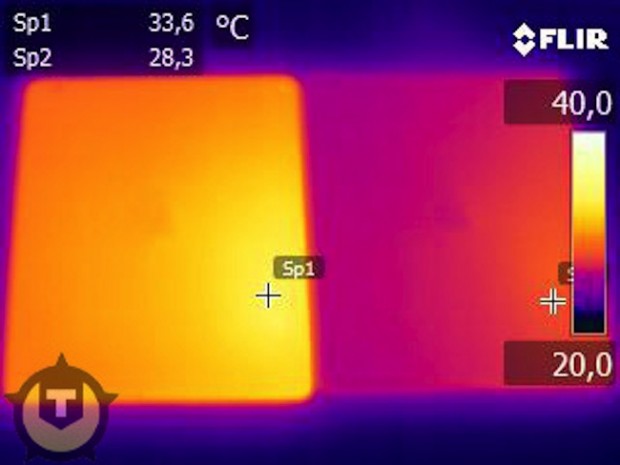
5 Reasons Why Your New iPad (iPad 3) Runs Hotter Than Your iPad 2

A lot of people are talking about the proposed ‘heatgate‘ issues effecting the new iPad (iPad 3). In fact earlier today we told you that the new iPad ran about 10 degrees hotter than the iPad 2. Now although heatgate seems to be a hot topic right now, a lot of people are not talking about the reason why the new iPad becomes warm during prolonged use. It is not a design flaw like Antennagate, rather, the actual specs of the new iPad that contribute to the increased operating temperature.
New iPad (iPad 3) heatgate
As brought to light by 9to5Mac, CNET spoke with DisplayMate’s Raymond Soneira about just why the new iPad is a bit “toastier”…
  1. Twice the LEDs: That means more heat coming from more LEDs. This is especially a problem at full brightness.
  2. 2.5X the power needed: The brightness efficiency is lower, because the new iPad has more pixels (which means more transistors) compared to the iPad 2. More pixels and transistors take up more space, meaning less opportunity for light to pass. “So they basically have to blast light through the LCD to make it come out.” Soneira adds: “I measured the LED power at maximum brightness–it’s two and a half times greater than on the iPad 2.”
  3. Battery generates more juice: The battery has to push out more power. This makes the battery warmer.
  4. Traditional LCD technology: Sharp’s power-efficient IGZO technology was not ready for the new iPad, which forced Apple to use traditional —and less power efficient— amorphous silicon tech. [To be fair, the older iPads also used this tech. Perhaps Apple was hoping to go 100-percent IGZO to offset the above].
  5. Qualcomm LTE Chip: Although not officially mentioned by CNET, the new iPad’s 4G connectivity support, allowing for faster than home broadband speeds, increases the operating temperature during continuous use due to the strain on the battery.
When you consider what Apple packed into the new iPad it is nothing short of a miracle that they managed to keep the operating temperature at only about an increase of 10 degrees to previous generations. Have you noticed that your new iPad runs hot during gaming or prolonged use? Share your responses in the comments section below…

Apple iPad 3 Announced – First Review

iPad 3
When Apple said ” we have somthing you really have to see . And touch”, we  knew the  iPad3 was coming and expected that it will be way smarter than the iPad2 . iPad 3 had become  the trending topic in the internet for few days.and now  finally its is out , the wait is over apple has announced iPad 3.  we expected a lot from apple and it have gave us the best . The new Apple ipad 3 will be far more advanced than its predecessor   the iPad 2  .Let me share with you what all we could know so far about the ipad3
  • Retina display for watching your content in high quality
  • New iPad will contain a A5X processor complete with quad-core graphics
  • A  high-resolution screen with a 264 ppi
  • The voice recognition system something like the siri  incorporated in the iPad3 supports US English, British, Australian, French, German, and Japanese
  • Apple ipad 3 will contain a 5 Mp camera with back side illuminated sensor and five-element auto focus and in addition the camera can also record video in 1080p.
ipad 3
  • iPad 3 will be  9.4mm thin and weighs in at 1.4lbs. That’s slightly heavier than the iPad 2 but the additional weight is because of the  larger batteries that give the new iPad, complete with its new screen and LTE radio, the same 10 hour battery life found in the iPad 2 (9 hours on LTE.)
ipad 2 vs ipad 3
  • Apple has also equipped  iPad 3  with high speed networking.this will  sports 21 Mbps HSPA+, 42Mbps DC-HSDPA and 73Mbps LTE. This is blazing fast data connectivity in your hand
ipad 3
just by seeing the below  comparison we can understand the reason why apple iPad 3 has chosen to come as an LTE version

speed comparison
 Apple iPad 3 will be released officially on  March 16th in the following countries
ipad 3
ipad 3 release in various countries
 Price remain from previous models: the 16GB is $499, 32B $599 and 64GB $699. Likewise, the LTE versions are $629, $729 and $829. pre booking starts today and price in India will be approximately  42000/-

The “New iPad”: Will it Keep Apple at the Head of the Pack?

After months of anticipation, gobs of fanfare and a good amount of leaks and speculation, the world now officially knows everything about the next generation iPad tablet computer from Apple (AAPL) that it didn't already, which can be boiled down to two words: not much.
The same can be said for the company's stock which was more or less flat as of the writing of this post. So what does it all mean for Apple going forward? Gone are the days when it took a few months for a product to actually go on sale after its splashy introduction to the world, which allowed for much greater period to speculate over demand. In short, you can no longer rely on that almost certain pop in Apple shares as excitement builds ahead of new products. In fact, analyst David Garrity of GVA Research suggests today's iPad product tweaks can effect other manufacturers as much, if not more, than Apple itself.
As for those tweaks and what they mean for those looking to buy (or not buy) the new device, most of the improvements in the lamely named "New iPad" were fully known in advance. They are not only largely incremental from the iPad 2, but also available in other products already on the market.
Still, one big improvement could make the new iPad just as sought after as its previous models: "The move to 4G LTE connectivity (faster internet) is going to mean a great deal in terms of this device supplanting other types of computing devices, whether it's desktops or laptops," Garrity says in the attached clip. He also says it will be interesting to see if the inclusion of 4G on the new model, as well as the reduced price on what he jokingly calls "the ancient iPad" will have much effect on enticing more commercial or enterprise users to adopt the technology.
Speaking of new technology, with the release of the new iPad speculation has already begun as to when the "iPhone 5" or the much talked about "iTV"might be rolled out.
"They may come out and call it the 'New iPhone,'" Garrity says in light of today's naming tweak of the iPad, adding that whatever name the smartphone eventually takes, it's something we can expect "by the end of June," with some update on Apple's TV offering coming in the second of half of the year.
What do you think of the new iPad? Are you moved enough to buy one or happy with what you've got?

Is it “iPad HD” Instead of iPad 3?

March 7 is not very far now. It’s five days at best and speculations of the name of the device that Apple is going to launch / release is already ripe. Well, for us, it’s still the iPad 3 but several indications have now surfaced which seem to think otherwise. iPad HDSome tweet leaked the inventory at Griffin’s which makes high-quality case covers for iPads and other iDevices. The listing shows three occurrences of what is termed as iPad HD (3). So is the iPad 3 really called “iPad HD”? Perhaps.griffin-ipad-hdAnother popular case cover manufacturer, Belkin, has also been reported to have named the iPad 3 as the iPad HD.
There is this application called Tapatalk for the iPad, BlackBerry and other devices, whose usage data has been depicted by Gizmodo. The report there points out to a small percentage of the usage coming from what’s termed “iPad HD.” tapatalk-ipad-usageOf course, the data pointers could be changed easily so there’s no concrete proof that the iPad 3 is actually named iPad HD. As regards nomenclature, there has always been this time of intense speculation in every iDevice’s pre-release time span. We had discussions about the iPhone, about the iPad when it first arrived, and about other iDevices too (for instance, iTV).
The iPad HD naming claim comes with a supportive stance though. The most prominent of iPad 3 featuresis the dual-LED backlit display offering a HD display that far exceeds the Retina Display on iPhones. Could this answer the “iPad HD” nomenclature?
Other awesome iPad 3 features that have been constantly rumored are the A6 processor, enhanced cameras and LTE connectivity (which is highly anticipated).
The March 7 iPad 3 release date seems to have caught up with the entire fraternity now. If the iPad 3 is launched then, when would be iPad 3 release date? We can speculate that a full-fledged release might happen in mid-April or May depending on the demand and the supply chain segment.
Anyway, let’s all wait for the huge happening that will settle the name – iPad 3 or iPad HD!

tutorial : How to Install Installous on iOS 5.0.1 for iPhone, iPad and iPod Touch?

iOS 5.0.1 Untethered jailbreak has already been released by iPhone Dev-Team. After jailbreaking your iDevice, Installous is one of the must have Cydia apps  you should install. Updated version Installous 4.4.2 is now compatible with iOS 5/5.0.1.
Installous is used to install cracked iPhone apps on your iDevices. Following is the step by step guideline about how to install Installous 4.4.2 on iPhone, iPad or iPod Touch running iOS 5/5.0.1 and Older Versions of iOS.
Step 1: First of all your iDevice should be jailbroken.
Step 2: Now launch Cydia on your jailbroken iDevice.Step 3: Tap on “Manage” tab at the bottom, and then tap on the “Sources”.
Step 4: Now tap on the “Edit” button at the top right corner and then on “Add” button on the top left corner of the screen.Step 5: Now add http://cydia.hackulo.us repository in field and tap on “Add Source” button.
Step 6: Now Cydia will update its repo list. Once it is done, tap on the Search tab at the bottom and type Installous in the search field and select the Installous 4 from the search result.
Step 7: Now tap on the “Install” button and then on the “Confirm” button to install Installous.
Step 8: At last tap on the Restart SpringBoard to reboot your device and you are done.
That’s all! Installous 4.4.2 is successfully installed to enjoy any app for free from the App Store.

Gem Keeper v1.0 iPhone iPod Touch iPad

Description:
With 14 unique towers and 30 thrill-powered stages, Gem Keeper challenges your gamer skills to the max. Scheme, strategize, and dare to achieve the ultimate ‘Perfect Clear’. The game doesn’t end there – compete against your friends (and the world) in Endless Mode, and show them who’s number one. **Leaderboards to be included in future updates.

Features:
  • 3 gorgeously crafted themes
  • 30 individual levels (x3 if you count the difficulty settings)
  • 14 unique defense towers
  • 22 different enemies
  • 4 ultimate boss enemies
  • …and more to come in future updates!
Release Name: Gem.Keeper.v1.0.iPhone.iPod.Touch.iPad-iOSPDA
Size:
113.63MB


Download: FiLESONiCWUPLOAD

Warm Gun v1.03 iPhone 3GS iPhone 4 iPod Touch 3 iPod Touch 4 iPad

Description:
World War III has been fought to the tipping point and ecologists long unheeded cries have been silenced by the grim truth of their predictions. To the last drop of oil have the worlds resources been depleted, and only sporadic traces of modern structure can be sifted in the dust. Time ticks forward, but humans must retrace their advancement back; through a history that has already been lived and to the Wild West for the second time. We have trampled ahead to the past in muddy boots, to the United States of late 19th century. This spun western lets you take control of 4 original characters; choose from weapons new and strange and a wider range of modern contraptions with primitive power. Classic and innovative, undoubtedly original, every FPS player will find satisfaction with Warm Gun.

Release Name: Warm.Gun.v1.03.iPhone.3GS.iPhone.4.iPod.Touch.3.iPod.Touch.4.iPad-iOSPDA
Size:
175.37MB


Download: FiLESONiCWUPLOAD

Jelly Defense v1.05 iPhone 3GS iPhone 4 iPod Touch 3 iPod Touch 4 iPad

Join the Jelly forces now and lead them to glory in this uneven and fierce fight against the invaders!
Description:
Use your tactical skills and wisdom to tip the scales of victory in your favor in order to save the Diploglobe and the Jelly nation from the agressors! That’s right, you are their only hope – the one they call the liberator, the true leader, the Jelly savior! You are the hero they deserve! Just look at these poor little creatures. They trust you, they believe in you, they rely on you. Can you refuse those big faithfull eyes (or eye)? You’re really their only hope!

What’s New in Version 1.05:
  • retina icon
  • a big update is on the way!
Release Name: Jelly.Defense.v1.05.iPhone.3GS.iPhone.4.iPod.Touch.3.iPod.Touch.4.iPad-iOSPDA
Size:
76.38MB


Download: FiLESONiCWUPLOAD

Will Siri only work on iPhone 4S? What about iPad?

Siri on iPhone 4S
During my pre-Apple days, I was already fascinated by a voice recognition program called Dragon Naturally Speaking.  I dabbled with it for a while but since the hardware needed to run the program was on the extreme side, I could say that I didn’t get what I expected from the program.  It was just too tedious to do: check that you have a powerful enough system, install the software, train the program for about ten years (just kidding) in a very quiet atmosphere so that it’ll learn your voice and words at the same time, further train it so that it can follow commands and then wait for the garbage to come out on the screen. Frustrating indeed!

Fast forward to the present and we see Apple presenting Siri to a captive audience during its recent media event and launch of iPhone 4S on October 4th. Sure, Apple has attempted to give voice recognition to its older releases of the iPhone, particularly the 3GS and the iPhone 4, but voice control for these iPhones is really just an experiment when compared to Siri, iPhone 4S’ exclusive Voice Assistant.
Still, I was a little bit disappointed with the release of iOS 5 that Siri has remained an iPhone 4S exclusive. As we all know, the iPhone 4S is powered by the same A5 processor used in the iPad 2. And the iPad 2 also has a built-in microphone – I’m wondering why Siri is not available my beloved iPad.
But before we go into that any further, let’s just check the existing state of Voice Control for the iPhone 3GS and 4. Right now, Voice Control for these devices just doesn’t function on either the iPad or the iPad 2 for the very simple reason that they would be totally useless. The presently available Voice Control on these older devices simply lets you control music playback, dial a contact number, start a FaceTime call, get some info about the currently playing music or get the time… Not much really. But the reason for this is that the older iDevices’ hardware is not powerful enough to handle anything more.
Now comes Siri with its myriad commands specifically designed for a powerful device such as the iPhone 4S.  So the iPhone 4S is announced with Siri in tow but why not for the iPad 2 which shares the same hardware as the newly announced iPhone 4S?  Everything presented during the Apple event – from setting up Reminders and posting Calendar events to searching for anything and everything in Wiki – all of these can be done using the iPhone 4S AND the iPad 2!
Perhaps Apple has reason which it chooses to keep a secret right now. Perhaps Siri’s usefulness must first be tested before Apple rolls it out to iPads. Anyway, all I know is I want SIRI on my iPad and I want it now!
If I can’t get Siri from Apple then I do know I can get it somewhere else…  You know how busy the jailbreaking community can be and it won’t be long before they come out with something like or even better than Siri for iPad.

[tutorial] Wi-Fi Sync for iPhone, iPad, & iPod touch with iOS 5

By far one of the best features of iOS 5 is wireless syncing and backing up, as the name implies it allows you to wirelessly transfer apps, music, books, contacts, calendars, movies, photos, everything you had to use a wired sync for, but it’s done through the air. If your device supports iOS 5, it’ll support Wi-Fi syncing, including iPhone 3GS, iPhone 4, iPhone 4S, iPad, iPad 2, and iPod touch 3rd & 4th generations.
Wireless syncing requires iOS 5 and iTunes 10.5 or later, be sure you have both installed before attempting to enable syncing through wi-fi or else the option won’t be visible. This setup process is the same on Mac OS X and Windows, and is fully compatible with both if you are syncing to the different platforms.

Set Up Wireless Syncing in iTunes 10.5 & iOS 5 for iPhone, iPad, & iPod

You’ll have to connect your iOS device to your computer to set it up, but after that you’re wire free with the exception of charging the hardwares battery.
From iTunes 10.5+
  • Connect the iOS device to the computer
  • Open iTunes and click on your iPad, iPhone, or iPod touch from the left side of the window
  • Click on the “Summary” tab in iTunes
  • Scroll down and click the checkbox next to “Sync with this iPhone over Wi-Fi” (or iPad or iPod touch)
Enable wireless syncing in iOS 5 for iPhone and iPad
With the iTunes side enabled, now pick up the iOS device to finish the process:
From iOS 5
  • Launch “Settings” and tap on “General”
  • Tap on “iTunes Wi-Fi Sync”
  • Select the computer you set up wi-fi syncing on in the prior iTunes step
  • Tap on the “Sync” button to start the wireless syncing
You can also double-check that this is working by disconnecting the iPhone or iPad and then choosing the “Sync” option from iTunes on the Mac or PC, you’ll see the familiar sync screen on your device.

Using Wi-Fi Syncing with iOS 5

Once wi-fi syncing is enabled and set up properly, the iOS device will automatically sync wirelessly any time the hardware is connected to a power source, including the USB cable, speaker docks, or otherwise. This process will also backup your iPhone or iPad automatically and wirelessly. Other than that automatic process, you can also initiate manual backups and syncing from the iPhone/iPad or from iTunes on the Mac or PC:
Start a Wireless Sync from the iOS 5 Device
  • Tap to “Settings” > “General” > “iTunes Wi-Fi Sync” and tap on the ‘Sync’ button
Start Wi-Fi Sync from iPhone
At any point you can cancel this by tapping the “Cancel Sync” button.
Start Syncing Wirelessly from iTunes on a Mac or PC
If you want to initiate a manual sync, you can continue do so by selecting that button within iTunes.

Start a wireless sync in iTunes to iOS device
If you want to really take advantage of wi-fi syncing and the PC-free experience, don’t forget to sign up for iCloud too, it’s very easy and free for the first 5GB of cloud storage with Apple.
Troubleshooting Problems with Wireless Syncing
There’s a variety of potential issues and fixes, Apple provides has a few helpful tips if you run into any issues:

  • Verify the iOS device is running iOS 5 and the PC or Mac is running iTunes 10.5 or later
  • Quit and relaunch iTunes
  • Restart the iPhone, iPad, or iPod touch
  • Reset the wireless router
  • Verify the iOS device is connected to the same Wi-Fi network as the Mac / PC
  • Check for network interference from cordless phones, metal barriers, interfering wi-fi signals, microwaves, etc
  • Verify firewall settings and that TCP ports 123 and 3689 in addition to UDP ports 123 and 5353 are open and accessible (these are ports iTunes uses)
There doesn’t seem to be any limitation on the number of iPad, iPhone, or iPod touch devices that can be used with this, although you may run into the traditional limit of Macs or PC’s that an iOS device can be linked to.

Redsn0w Can Jailbreak iOS 4.3.5 On iPhone 4, 3GS, iPad, iPod touch. Here’s How To Use It! [Tutorial]


Apple has unexpectedly pushed out an incremental update for iOS 4.3.x, and it is dubbed as iOS 4.3.5. This minor release is no more than a security update, aiming to patch issues with certificate verification.
iOS 4.3 WM
The good news is that we have tested it and can confirm that the current version of Redsn0w can jailbreak the just released iOS 4.3.5 on iPhone 4, 3GS, iPad 1, and iPod touch 4G/3G. But it will be limited to tethered boot, which means you will have to reconnect your device to your computer every time you reboot your iOS device. iPad 2 is obviously not supported. This has also been confirmed by MuscleNerd of iPhone Dev Team:
@zaone @m1ckey29 ah ok thanks for checking! So those who really do want tethered 4.3.5 can use redsn0w pointed at 4.3.4 (except iPad2)
4.3.5 Jailbreak[4]
Note: Those relying on a carrier unlock must stay away from Redsn0w.
How to Jailbreak iOS 4.3.5 (Tethered)
Step 1: Download iOS 4.3.5 and iOS 4.3.4 (required by this version of Redsn0w) firmware file for your device from the links given at the end.
Step 2: Download Redsn0w 0.9.8b4 for Windows or Mac. Also make sure you are running the latest version of iTunes, which is version 10.4.
Step 3: Now start Redsn0w, browse for the iOS 4.3.4 firmware file (NOT the 4.3.5) that you downloaded in Step 1 and point it towards Redsn0w. Refer to the screenshots below:
4.3.4-Jailbreak
4.3.2-Untethered-Jailbreak-2
Step 4: Once Redsn0w is done recognizing the firmware file, click Next and there you’ll be taken to a new window. Simply check the “Install Cydia” box as shown below and leave other options as it is for now. Once done, click Next.
4.3.2-Untethered-Jailbreak-3
Step 5: On this screen, Redsn0w will instruct you to power down your device and plug it in to your computer. Follow the onscreen instructions and then click Next to continue.
4.3.2-Untethered-Jailbreak-4
Step 6: On this screen you will have to put your device in DFU mode with a combination of the Power button and the Home button for a certain amount of time, simply follow the onscreen instructions on how to do so. The combination is usually like this:
  • Hold down Power button for 5 seconds.
  • Now without releasing the Power button, hold down the Home button simultaneously with the Power button for 10 seconds.
  • Let go of the Power button but keep on holding the Home button for another 15 seconds.
If you performed the above mentioned steps correctly, then your device should be in DFU mode.
4.3.2-Untethered-Jailbreak-5
Step 7: Redsn0w will now jailbreak your device, don’t do anything weird at this point, just let Redsn0w finish. We would recommend that you don’t do anything with your PC or Mac at all during the process. Sitting idle and waiting for the process to end on its own is much advised.
Since this is a tethered jailbreak, therefore whenever your iOS device loses power, it will go into the dreaded Apple logo boot screen loop. To get out of that, simply start from Step 3 again and in Step 4, uncheck “Install Cydia” and instead check “Just boot tethered right now” option and hit “Next” with your iPhone, iPad or iPod touch connected to your PC or Mac. And yes, you will have to do this every time when your device reboots or loses power.
Redsn0w-1
That’s it! You should now have a jailbroken iPhone, iPad, or iPod touch running iOS 4.3.5.
Download iOS 4.3.5 for iPhone 4, 3GS, iPod touch and iPad
Download iOS 4.3.4 for iPhone 4, 3GS, iPad, iPod touch
Download Redsn0w 0.9.8b4 for Windows
Download Redsn0w 0.9.8b4 for Mac
Download iTunes 10.4 for Windows & Mac

List of iPad IPAs for the Letter R - 2011.04.07

Application Pack iPad iPhone (April/13/2011- P2P)

Application Pack iPad iPhone (April/13/2011- P2P)

Application Pack iPad iPhone (April/13/2011- P2P) | 434.7 MB


1- Com2uS Corp World of Tunes v1.3.0 iPad iPhone iPod Touch-Lz0PDA
2- DeluxeWare Click Deluxe 2 v1.2.3 iPad iPhone iPod Touch-Lz0PDA
3- Evenwell Digitech Inc Allin1 GameMeMore v1.0 iPad iPhone iPod Touch-Lz0PDA
4- Craneballs Studios 33rd DIVISION v1.2 iPad iPhone iPod Touch-Lz0PDA
5- Electronic Arts THE GAME OF LIFE Classic Edition v1.1.27 iPad iPhone iPod Touch-Lz0PDA
6- Gamerizon Chop Chop Ninja v1.6 iPad iPhone iPod Touch-Lz0PDA
7- Jonathan Mulcahy Z is for Zombie v2.1 iPad iPhone iPod Touch-Lz0PDA
8- Gamerizon Chop Chop Soccer v1.5 iPad iPhone iPod Touch-Lz0PDA
9- Herp Games Doodle Wars Ship vs Stick v1.0 iPad iPhone iPod Touch-Lz0PDA
10- Doodle StickLLC ALLIN1 Stick USA Wars v1.0 iPad iPhone iPod Touch-Lz0PDA
11- Magic Cube Infect Them All v1.0.7 iPad iPhone iPod Touch-Lz0PDA
12- Melior Solutions Sparky the Dog v1.3 iPad iPhone iPod.Touch-Lz0PDA
13- Nate Games GrandPar Golf v1.0.1 iPad iPhone iPod Touch-Lz0PDA
14- Lei Li Brave Panda Jump v1.1.0 iPad iPhone iPod Touch-Lz0PDA
15- Origin8 Sentinel.2 Earth Defense v1.5.0 iPad iPhone iPod Touch-Lz0PDA
16- PixelSticks StickSiege v1.0 iPad iPhone iPod Touch-Lz0PDA
17- ITankster com 125Plus in 1 AppBundle v2.4 iPad iPhone iPod Touch-Lz0PDA
18- RedLynx Ltd Monster Trucks Nitro v1.72 iPad iPhone iPod Touch-Lz0PDA torrent
19- PressOK Entertainment Finger Physics Thumb Wars v1.2 iPad iPhone iPod Touch-Lz0PDA
20- SkyVu Pictures BATTLE BEARS 1.v1.5.1 iPad iPhone iPod Touch-Lz0PDA
21- Softmines Bloody Hell v2.0 iPad iPhone iPod Touch-Lz0PDA
22- Tapbots Convertbot The Amazing Unit Converter v407 iPad iPhone iPod Touch-Lz0PDA
23- Taplay Virus Laboratory v1.5.0 iPad iPhone iPod Touch-Lz0PDA
24- Triniti Interactive Limited Hired Gun v1.6 iPad iPhone iPod Touch-Lz0PDA
25- Webreach.Limited Jelly SMS v3.2.0 iPad iPhone iPod Touch-Lz0PDA
26- WeeWorld WeeMee Avatar Creator v63 iPad iPhone iPod Touch-Lz0PDA
27- Affogato LLC Strategery v3.3.2 iPad iPhone iPod Touch-Lz0PDA
28- SQUARE ENIX Co LTD SLIDING HEROES v2.0.0 iPad iPhone iPod Touch-Lz0PDA
29- Resolution Interactive AB BioDefense Zombie Outbreak v1.0.0 iPad iPhone iPod Touch-Lz0PDA
30- Hectic.Ant.Code.Viewer.2.v1.3.1.iPad.iPhone.iPod.Touch-Lz0PDA
31- 288.Vroom.LLC.The.Sherlock.Holmes.Collection.for.iPhone.v4.1.iPad.iPhone.iPod.Touch-Lz0PDA
32- Alex.Britton.Doodle.Zombies.v1.0.iPhone.iPod.Touch-Lz0PDA
33- Another.Castle.Studios.inc.Kingdom.of.Gnester.v1.2.iPad.iPhone.iPod.Touch-Lz0PDA
34- Blowfish.Studios.Pty.Ltd.Qbism.HD.v1.2.iPad.iPhone.iPod.Touch-Lz0PDA
35- AppZap.Allin1.Logic.GameBox.v1.9.iPad.iPhone.iPod.Touch-Lz0PDA
36- Blue.Shadow.Games.S.L.DEATH.COP.Mechanical.Unit.v2.0.1.iPad.iPhone.iPod.Touch-Lz0PDA
37- Bravo.Touch.Racing.Nitro.Ghost.Challenge.v1.2.iPad.iPhone.iPod.Touch-Lz0PDA
38- Codefreeze.Jet.Ball.v10.1.iPad.iPhone.iPod.Touch-Lz0PDA


Download (FileSonic) :

http://www.filesonic.com/file/751520931/Application_Pack_iPad_iPhone_April_13_2011-_P2P.part1.rar
http://www.filesonic.com/file/751811304/Application_Pack_iPad_iPhone_April_13_2011-_P2P.part2.rar
http://www.filesonic.com/file/751879744/Application_Pack_iPad_iPhone_April_13_2011-_P2P.part3.rar
http://www.filesonic.com/file/751557151/Application_Pack_iPad_iPhone_April_13_2011-_P2P.part4.rar
http://www.filesonic.com/file/751766654/Application_Pack_iPad_iPhone_April_13_2011-_P2P.part5.rar

Mirror (FileServe) :

http://www.fileserve.com/file/BPcFWhF/Application_Pack_iPad_iPhone_April_13_2011-_P2P.part1.rar
http://www.fileserve.com/file/PhpR2ms/Application_Pack_iPad_iPhone_April_13_2011-_P2P.part2.rar
http://www.fileserve.com/file/5mcb4Vv/Application_Pack_iPad_iPhone_April_13_2011-_P2P.part3.rar
http://www.fileserve.com/file/KeyAkCW/Application_Pack_iPad_iPhone_April_13_2011-_P2P.part4.rar
http://www.fileserve.com/file/FjShEzR/Application_Pack_iPad_iPhone_April_13_2011-_P2P.part5.rar